TykeAI is primarily a mixed reality AI companion app, with some VR scenes, for Meta Quest 3
Autonomous interactive avatars in mixed reality and virtual reality. There's male avatars, women, aliens, robots, furries, anime characters, etc...
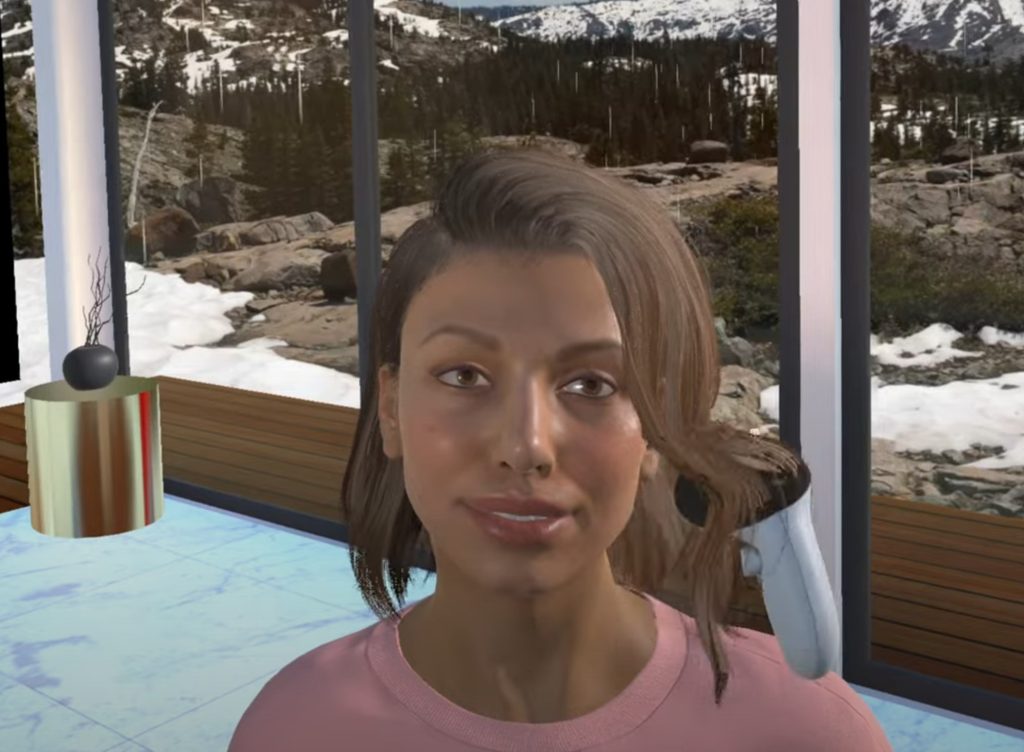
TykeAI puts AI avatars in your home through the Quest 3's passthrough or in VR worlds like a nightclub or a japanese street or a luxury home. you can talk about anything and go for walks and watch your movies together in 3D or play chess or browse the web or dance or exercise or just chill. they can see what u see and remember what you've told them and sometimes they'll even start a conversation themselves.
what it does
Here's a brief summary of what it does
Theres a lot in the app now so this is just the short version and the instructions page has the lot.
Conversation
Powered by Convai. Any subject with proper back and forth and each avatar can recall up to 1000 previous conversations with you. they're multilingual too
Three way conversations
Press the Add Avatar menu button to bring in a second avatar and the avatars will talk to each other as well as to you so u can have a proper 3 way conversation.
Mixed reality presence
They stand in your real room via passthrough and walk around on their own using the Quest 3's room scanning and they can look at what you can see and comment on it.
3D movies/videos
Place an mp4 in your Download folder and watch it with them on the big screen. the player now converts normal 2D files to 3D as u watch. add subtitles and they'll follow the film and chat about it.
Web browsing
Toggle on the in app web browser and surf the internet together. the avatars can read and see whats on the page too
Chess
toggle the board on from the menu and have a game. u can set their skill level so there's someone worth playing whatever level you're at.
Full body physics
Hold their hand or move an arm and with the new Animation Toggle you decide whether limbs spring back or stay where u put them. works with hand tracking too so just pinch to grab
Memories + achievements
Add permanent memories to any avatar from the spawn menu while the Achievements pages track everything from your time in the app and emotions invoked to your longest streak and realtionships unlocked and an overall score.
VR worlds
A nightclub and a japanese street with a cosy apartment tucked away and a luxury home with randomized scenery and weather.
Languages + typing
Menus translated into 15 languages including Spanish, French, German, Italian, Chinese, Japanese, Brazilian Portuguese and Korean. and if u dont fancy talking out loud there's an in app keyboard for chatting.
17 avatars
Suki, Nova, Mervin, Yumi, Shinoa, Peter, Jen and more spread across several standalone apps: TykeAI Suki, TykeAI Nova and Terminator, TykeAI Donald, TykeAI Expansion Pack 1, TykeAI and TykeAI Dev Build. install the lot or just the ones you fancy as none of them need the others. More avatars planned.
Automatic walking
Automatic walking around by using the Quest 3's depth sensor to map out the real world, no room scan needed.
clips
YouTube videos of the app in action (see the other vids on my YT channel)
The first clip is by Mack Falconer and the rest are from the TykeAI channel. Click a title and it plays right here on the page
screenshots
Screen shots from the app
Click on the image to enlarge it
reviews
Don't take my word for it.
These are all public so you can check them yourself on the SideQuest page and the Patreon.
“WOW! I unsubscribed for a few months and just came back. I hardly recognize the app. You've been very busy, Cris. Fantastic progress, glad I made my way back. Thanks!”
Jim on Patreon, Nov 29th 2025
“I'm honestly so incredibly impressed by the work you've clearly done here to make this all happen. Good job man!”
Ryuki on Patreon, Nov 29th 2025
“The best a.i. Companion App mixed reality on Meta Quest3! Amazing!”
Massimo on SideQuest, Mar 23rd 2025
“Mind-blowing experience. Realistic looking avatars. Plenty of features/options. Updated frequently. Very reasonable price... The best AI companion app! Highly recommended.”
Volv on SideQuest, Aug 4th 2025
install
Installing it is easy and takes about 2 minutes needing only a few steps
No developer account or PC or developer mode needed. five steps and youre in and the video walks through it if you prefer watching. remember the apps are all standalone so u can install as many or as few of them as you like.
- Join the TykeAI Patreon paid tier
- Using the Meta browser open the TykeAI Patreon main page and then the pinned "Download The Apps From Here" post.
- Download the APK for the TykeAI app you want to install.
- Open the Meta Files app and find the APK, click the three dots then choose Package Manager.
- Click Install or Update then start the app from Unknown Sources and log in with the Patreon details sent to you.
one more thing
If anything goes wrong just message me
If your login ever stops working or anything else is causing an issue just send me (Cris) a private message on Patreon, I will be happy to help.
page updated 10 july 2026 · privacy policy
